nps是一款轻量级、功能强大的内网穿透代理服务器。
支持tcp、udp流量转发,支持内网http代理、内网socks5代理,同时支持snappy压缩、站点保护、加密传输、多路复用、header修改等。
尤其是支持web图形化管理,集成多用户模式,这个比frp要好!
- 准备安装
在安装前,我们需要准备:
一台拥有公网地址的云服务器
一台需要映射出去的本地服务器
系统都是centos
注:其他系统也可以使用,只是我自己习惯使用centos。
- 安装云服务器 server端
2.1 nps地址:
GitHub:
https://github.com/cnlh/nps已经发布的版本:
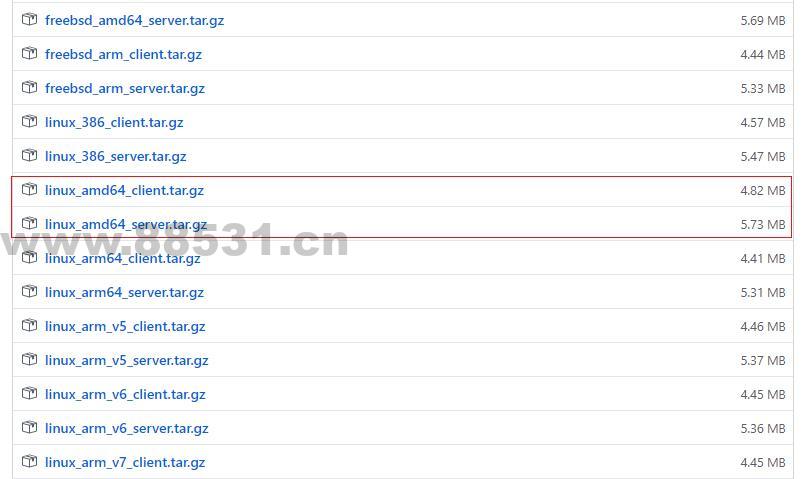
https://github.com/ehang-io/nps/releases目前最新的V0.26.1版本,32位就选386,64就选amd64,具体还是以实际情况为准。
2.2 安装wegt
这个命令新的操作系统不一定有,按我们先安装上吧!
yum -y install wget
2.3 下载nps server端
直接从github上下载。
wget https://github.com/cnlh/nps/releases/download/v0.26.1/linux_amd64_server.tar.gz
解压:tar -zxvf linux_amd64_server.tar.gz
安装NPS:./nps install
修改配置文件:vim conf/nps.conf 里面有默认端口、用户名和密码,如不需要修改就跳过
安装宝塔面板的用户注意:(1.因为nps默认使用的TCP端口是80 443 8080 8024,宝塔面板的80 433 8080会被占用,因此这时候打不开nps的前端Web管理页面;我们需要修改nps的配置文件,后重新启动nps服务。
2.找到nps.conf文件,在宝塔根目录的etc文件夹下,路径/etc/nps/conf/nps.conf。)
appname = nps

runmode = dev

#HTTP(S) proxy port, no startup if empty
http_proxy_ip=0.0.0.0
#http_proxy_port=80  //80端口建议禁止注释掉,在宝塔面板上安装的nps不会用到
#https_proxy_port=443  //443端口建议禁止注释掉,在宝塔面板上安装的nps不会用到
https_just_proxy=true
#default https certificate setting
https_default_cert_file=conf/server.pem
https_default_key_file=conf/server.key

##bridge
bridge_type=tcp
bridge_port=8024  //与npc客户端通讯的默认端口,建议修改为其他端口如:8424
bridge_ip=0.0.0.0

# Public password, which clients can use to connect to the server
# After the connection, the server will be able to open relevant ports and parse related domain names according to its own configuration file.
public_vkey=123

#Traffic data persistence interval(minute)
#Ignorance means no persistence
#flow_store_interval=1

# log level LevelEmergency->0  LevelAlert->1 LevelCritical->2 LevelError->3 LevelWarning->4 LevelNotice->5 LevelInformational->6 LevelDebug->7
log_level=7
#log_path=nps.log

#Whether to restrict IP access, true or false or ignore
#ip_limit=true

#p2p
#p2p_ip=127.0.0.1
#p2p_port=6000  //p2p代理要使用的端口,如果需要使用p2p代理服务,也可以修改一下端口

#web
web_host=a.o.com
web_username=admin  //nps默认登录账号,建议更换为自己牢记的账号,如admin123
web_password=123  //nps默认登录密码,建议更换为自己牢记的密码,如admin123
web_port = 8080  //nps默认web管理页面访问端口,建议修改为其他端口如:9090
web_ip=0.0.0.0
web_base_url=
web_open_ssl=false
web_cert_file=conf/server.pem
web_key_file=conf/server.key
# if web under proxy use sub path. like http://host/nps need this.
#web_base_url=/nps

#Web API unauthenticated IP address(the len of auth_crypt_key must be 16)
#Remove comments if needed
#auth_key=test
auth_crypt_key =1234567812345678

#allow_ports=9001-9009,10001,11000-12000

#Web management multi-user login
allow_user_login=false
allow_user_register=false
allow_user_change_username=false

#extension
allow_flow_limit=false
allow_rate_limit=false
allow_tunnel_num_limit=false
allow_local_proxy=false
allow_connection_num_limit=false
allow_multi_ip=false
system_info_display=false

#cache
http_cache=false
http_cache_length=100

#get origin ip
http_add_origin_header=false

#pprof debug options
#pprof_ip=0.0.0.0
#pprof_port=9999

#client disconnect timeout
disconnect_timeout=60
启动服务端:./nps start
重启服务:sudo nps restart
上面的命令只能是启动,退出后程序会自动终结,因此我们需要下面的命令,让它不会停止!
nohup ./nps > file.log 2>&1 &
这样就可以,使用浏览器进行访问了,http://ip:默认端口8080
- 安装客户端
在安装客户端前,我们首先需要在后台控制页面创建客户端,然后将创建的参数写入到客户端配置文件中!
客户端常驻程序运行:
nohup ./npc -server=(ip:port) -vkey=(web界面中显示的密钥) > file.log 2>&1 &
如果遇到其它问题,试试下面的方法:
已解决,问题原因在于 宝塔官方,关闭了 80 / 443 /8080的 UDP回路
firewall-cmd –permanent –zone=public 80/udp > /dev/null 2>&1
firewall-cmd –reload
firewall-cmd –permanent –zone=public 8080/udp > /dev/null 2>&1
firewall-cmd –reload
firewall-cmd –permanent –zone=public 443/udp > /dev/null 2>&1
firewall-cmd –reload
然后创建个空网站,反向代理 127.0.0.1:8080 即可解决 ,我是腾讯云 不管装NPS / FRP 都是同样问题 用这个方式即可~
①还有一个重要的问题,由于80 443 被宝塔占用了, 需要先把NPS配置文件中的http 80 443 改 808 / 909 等未占用的 ,将NPS 和 宝塔 隔离 就可以正常访问了
②NPS 执行安装命令后 ,要改/etc/nps/conf 里的配置文件,非解压后的配置文件
创作不易,用心坚持,请喝一怀爱心咖啡!继续坚持创作~~